How to Find & Resume Claude Code Sessions on Mac
Software engineering workflows have undergone a massive shift. Developers no longer rely solely on basic autocomplete; today, we pair with autonomous CLI coding agents like Claude Code and Codex to execute multi-turn refactors, write unit tests, and resolve complex edge-case bugs across full repositories.
⚡ Claude Code & Codex CLI Quick Reference
| Claude Code Logs: | ~/.claude/projects/*/ (JSONL transcripts) |
| Codex CLI Logs: | ~/.codex/memories.sqlite |
| CLI Resume Command: | claude --resume <session-id> |
| GUI Search & Token Tracker: | L2Cache for Mac (1-click resume & token analytics) |
The Multi-Agent Visibility Gap: Autonomous agents generate vast amounts of session history, token consumption, prompt cache metrics, and discovered repository constraints. Yet, these logs remain trapped in hidden local files. Without a unified dashboard, developers lose track of past session context, waste money re-prompting agents, and watch different agents make the exact same coding mistakes over and over.
Where Are Claude Code & Codex Session Logs Stored on macOS?
When running agentic coding assistants in your terminal, every prompt, tool response, and diff is recorded locally on disk:
- Claude Code stores conversation logs inside your user home directory at
~/.claude/projects/<project-folder>/<session-uuid>.jsonl. Project directories contain raw JSONL session records with timestamps, tokens, tool arguments, and bash tool output. - OpenAI Codex CLI maintains session memories and tool execution logs under
~/.codex/sessions/YYYY/MM/DD/rollout-*.jsonlas well as persistent memory in SQLite.
Inside the JSONL: What Claude Code Actually Tracks
Every Claude Code session is a continuous JSON Lines (.jsonl) stream. Each line is an independent, valid JSON object recording a discrete event in the lifecycle of the session:
{"type":"session_meta","sessionId":"a85fd1e8-3b4a-4f12-89cd-7e62a104f982","cwd":"/Users/developer/apps/l2cache","timestamp":"2026-09-30T07:15:22.104Z","model":"claude-3-7-sonnet-20250219","aiTitle":"Fix memory leak in panel animation timer"}
{"type":"USER_INPUT","turn":1,"timestamp":"2026-09-30T07:15:23.002Z","content":"Fix the memory leak in panel animation where NSTimer is retained across window close"}
{"type":"PLANNER_RESPONSE","turn":1,"content":"Let's search for timer allocations in PanelAnimation.swift.","tool_calls":[{"name":"grep_search","args":{"Query":"Timer.scheduledTimer","SearchPath":"/Users/developer/apps/l2cache/src"}}]}
{"type":"TOOL_RESULT","turn":1,"tool_name":"grep_search","status":"DONE","output":"PanelAnimation.swift:42: self.animTimer = Timer.scheduledTimer(timeInterval: 0.016, target: self, ...)"}
{"type":"PLANNER_RESPONSE","turn":1,"content":"I will replace the strong timer reference with a weak target and invalidate on deinit.","tool_calls":[{"name":"replace_file_content","args":{"TargetFile":"/Users/developer/apps/l2cache/src/PanelAnimation.swift","StartLine":42,"EndLine":46,"ReplacementContent":"self.animTimer = Timer.scheduledTimer(withTimeInterval: 0.016, repeats: true) { [weak self] _ in\n    self?.updateFrame()\n}"}}]}
{"type":"TOOL_RESULT","turn":1,"tool_name":"replace_file_content","status":"DONE","output":"Successfully replaced lines 42-46 in PanelAnimation.swift"}
{"type":"turn_metrics","turn":1,"metrics":{"input_tokens":1280,"output_tokens":310,"cache_creation_input_tokens":6400,"cache_read_input_tokens":48920,"duration_ms":1140}}
Key Fields Tracked in Every Agent Session:
aiTitle: Claude Code generates a descriptive, high-level summary of the session's goal (e.g., "Fix memory leak in panel animation timer"). This title is crucial for finding past discussions quickly without reading raw terminal traces.USER_INPUTvs.PLANNER_RESPONSE: Full conversation flow between your requirements and the agent's internal chain-of-thought planning.tool_calls& Arguments: The exact tools invoked (grep_search,run_command,replace_file_content), target file paths, line numbers, and exact code diffs.TOOL_RESULT: Real-time stdout, stderr, compiler errors, unit test output, and return codes captured during execution.- Prompt Cache Analytics:
cache_read_input_tokenstracks how many tokens were served directly from Anthropic's prompt cache (saving 90% in cost and reducing latency by 80%), whilecache_creation_input_tokensrecords new prompt state written to cache.
Why Agent Conversation History Changes How You Work
Treating your Claude Code and Codex transcripts as a searchable repository memory—rather than a pile of disposable terminal sessions—fundamentally transforms day-to-day engineering velocity:
🔄 Stop Re-Explaining Complex Modules
If you spent 15 turns giving Claude or Codex deep architectural context on your auth layer or SQLite schema, don't start from scratch. Resume that exact session to maintain full context instantly.
🎯 Keep Architectural Decisions Consistent
Technical decisions compound across PRs. Resuming the original session prevents the agent from contradicting patterns, conventions, or design choices established days earlier.
⚡ Slash Token Costs & Prompt Latency
Re-explaining code burns input tokens and model warmup time. Continuing a warm session maximizes prompt cache hit rates (cacheReadTokens), saving up to 90% on API costs and cutting response times.
🧘 Manage Multi-Repo Contexts Calmly
When you can search and resume any agent conversation across multiple projects in one global hotkey panel, repository hopping stops incurring a massive cognitive context switch.
💡 Never Lose a Late-Night Fix
That brilliant regex or tricky concurrency workaround you found at midnight is indexed in your history. Search the tool output, resume the session, and reuse it effortlessly.
How to Search and Resume Past Claude Code & Codex Sessions
Both Claude Code and Codex CLI offer built-in terminal resumption commands:
💻 Native CLI Resume Commands Cheat Sheet
| Command | Tool & Purpose |
|---|---|
claude --resume (or claude -r) |
Open the interactive Claude Code session picker in current repo. |
claude --resume SESSION_ID |
Resume a specific Claude session directly by ID. |
codex resume |
Open the interactive OpenAI Codex session picker. |
codex resume --last |
Continue the most recent Codex session immediately. |
codex resume --all |
Include Codex sessions from all directories across your machine. |
Native CLI Resume vs. L2Cache History Dashboard
While native CLI commands are helpful for local directories, L2Cache for Mac bridges cross-project indexing, visual search, and token analytics:
Tracking Claude Code Token Usage and Prompt Cache Hit Rates
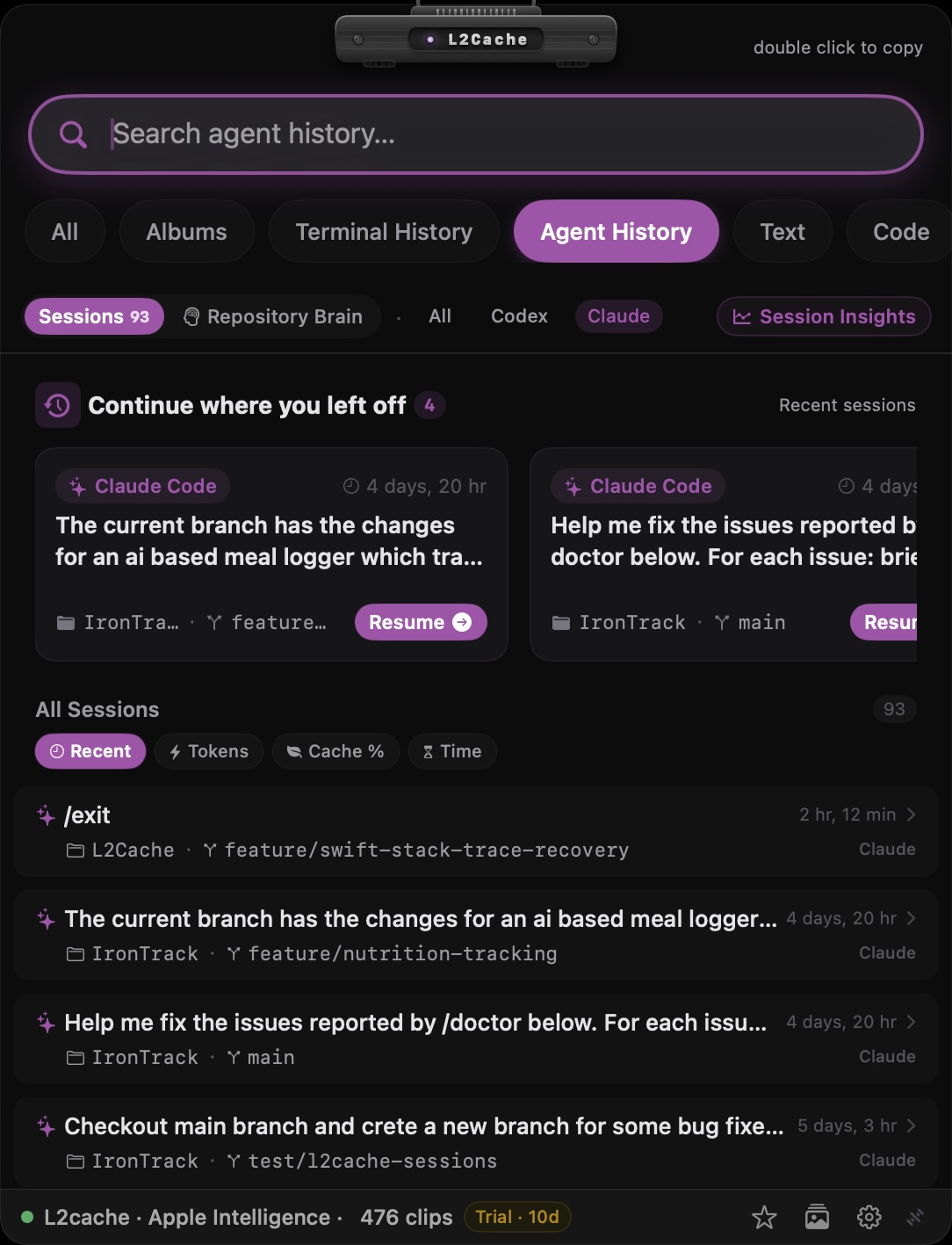
In L2Cache 1.4, we introduced native AI Agent History & Analytics—bringing full visibility to your CLI agent sessions directly from your Mac's menu bar or global hotkey.
Real-Time Token & Cost Breakdown
View total input tokens, output tokens, and overall token consumption for every session across Claude Code and Codex. Instantly identify token-heavy prompts or runaway context loops before they inflate API bills.
Prompt Cache Efficiency (Cache Hit Ratio)
Track cacheReadTokens and prompt cache hit ratios. See exactly how effectively your agent sessions leverage LLM prompt caching, allowing you to optimize prompt structures for maximum speed and cost efficiency.
Session Sorting & Fast Search
Sort past sessions by Recent Activity, Total Tokens, Prompt Cache Hits, or Runtime Duration. Filter sessions by provider (Claude vs. Codex) or search through full conversation histories instantly with SQLite FTS5 fast search.
Preventing Agent Memory Loss: Promoting Gotchas to AGENTS.md
When an agent spends 20 turns debugging a subtle AppKit threading bug, a SQLite concurrency issue, or a custom build flag constraint, it learns vital facts about your codebase. But when that session finishes, those insights often stay buried in local log archives.
L2Cache's Repository Knowledge Graph bridge converts transient agent discoveries into permanent repository documentation:
# Example AGENTS.md rule promoted from agent session #a85fd1e8
## AppKit & SwiftUI Concurrency Rules
- guard `view.window != nil` before displaying popovers in async tasks to prevent EXC_BAD_ACCESS.
- Never perform DB reads/writes on the main thread; use `Task` with `await`.
- Extract Discovered Gotchas: L2Cache parses agent execution logs to surface fragile components, recurring error tracebacks, and technical debt notes.
- 1-Click Promotion to AGENTS.md: Review extracted constraints and click "Promote to AGENTS.md" to write the rule directly into your project's root
AGENTS.mdorCLAUDE.mdfile. - Cross-Agent Alignment: Ensure all coding agents (Claude, Codex, Antigravity, or Cursor) share the exact same rules, preventing agents from repeating known bugs in future sessions.
100% Local, Zero-Cloud Privacy
Just like L2Cache's core clipboard management, all Agent History & Analytics parsing occurs strictly on-device on your Mac. L2Cache reads local session logs directly from your home directory, stores analytics in local SQLite databases using GRDB, and never sends your prompts, code snippets, or token statistics to external servers.
Frequently Asked Questions
❓ Where does Claude Code store session history on Mac?
Claude Code stores local conversation transcripts and project histories as JSONL files in ~/.claude/projects/ on macOS. Each session contains turn-by-turn prompts, tool executions, and file modifications.
❓ Where does OpenAI Codex CLI store session logs?
OpenAI Codex CLI stores agent execution memories and session databases in ~/.codex/memories.sqlite on your local disk.
❓ How do you resume a past Claude Code session?
Run claude --resume in your terminal to pick from recent sessions, or pass the specific session ID with claude --resume <session-id>. To search full past tool calls, file diffs, and prompts, use L2Cache's 1-click terminal resume panel.
❓ How can I track Claude Code token usage and costs locally?
L2Cache automatically parses local agent logs in real time, displaying input/output tokens, prompt cache hit ratios (cacheReadTokens), and session durations directly in a lightweight Mac menu bar panel.
Looking to find a conversation you already had? Browse the Claude Code session history viewer or Codex CLI history viewer for L2Cache’s Mac workflow.
Experience fast floating panel access, zero-cloud clipboard history, and native AI Agent History on macOS today.
Try L2Cache Free